Installing IE7 Final
Problems I found.
20th October 2006 · Last updated: 5th October 2016
I installed IE7. Or at least I tried to. After finishing the official tour on Microsoft's site, I clicked on the download button, only to receive a JavaScript error! Here's a screenshot of what I got. (Click on the image to enlarge it.)
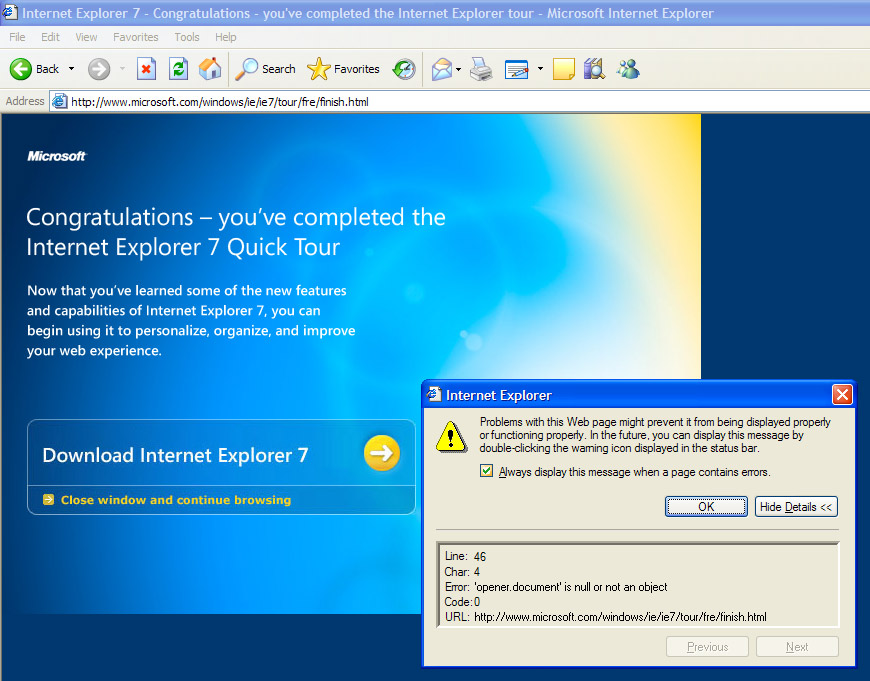
I could not download it at all! A great start. So I went back to the start of the tour and downloaded it from there instead, which did work. After saving the 14.8Mb file, installation was quick for me, though other users are reporting long delays. For some reason I had to revalidate Windows, but that only required pressing a button. I then had to reboot the computer. So far so good. But on firing up the program, I got this strange message:
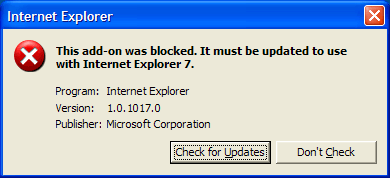
This had me stumped. What did it refer to? What was I supposed to do? I threw caution to the wind and pressed the button offered to "Check for updates". It turned out that this was the IE Developer Toolbar which required updating. Fine, but why didn't the programmers put the name of the program in the message? That way I would have known what the message was about!
Installing IE7 at work, I was able to add my default search engine straight away, following the options given when IE7 first loads. But when I tried the exact same steps at home, I got the following JavaScript error:
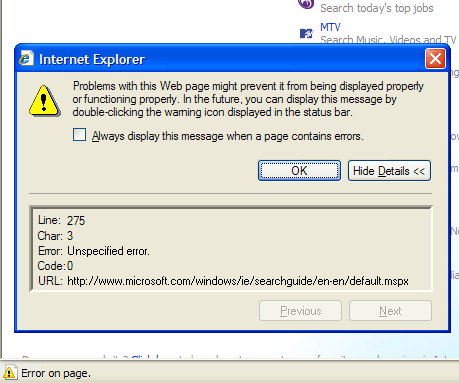
Clicking on the form fields to paste in the address to my chosen search engine proved impossible. The forms appeared fixed. No text could be entered into them. I have no idea why.
So what do I think of IE7? Sadly a lot of the problems I noted with the beta versions are still present, such as weird scrolling. I tried to like it more, but soon realised how restrictive it is compared to Opera and Firefox. Here are just a few things I noted:
- The Favorites Center (sidebar) can only be stretched to 450 pixels wide. In Opera, you can stretch the sidebar as far as you wish, even to the full screen width if you need. (Handy to read long links etc.) Firefox's sidebar can't be stretched as wide as IE7's!
- No fast-forward or rewind buttons.
- No keywords to open a bookmark (or group of bookmarks) directly! All you get is a shortcut key option, which defaults to CTRL + ALT. (So choosing the shortcut key "d" means to open the bookmark requires pressing CTRL + ALT + d. Compare this to Firefox and Opera, where any letters or words can be set up as a keyword, and typed directly into the address bar to open the related bookmark.
- If you use a different browser as your default, pressing the shortcut key in IE7 to open a bookmark opens it in your default browser instead!
- Deleting browser details doesn't remove the back button's drop-down menu entries.
I'll only use this browser for testing. The alternatives run rings around it if you ask me. Hopefully future updates will improve on this release. Microsoft have done well, but they still have a lot of ground to catch up if they want to impress users.
And I didn't even mention the new interface design... some things are too obvious. Just read the negative comments on the IEBlog about that!
Comments (1)
Comments are locked on this topic. Thanks to everyone who posted a comment.