Leopard Forms Issues
18th March 2008 · Last updated: 5th October 2016
Buttons | Textareas | Conclusion
Buttons
On an Apple Mac running OS X 10.5.2 ('Leopard') there are issues I've noticed regarding form buttons and text areas on web pages.
Firstly, form buttons. These are rendered as rounded 3D objects using the familiar Mac 'Aqua' theme. I'll use a Submit input button as an example. Here's what the button looks like when the user has clicked down on it using the mouse:

I'm using Opera 9.5 in the above screenshot but other browsers on the Mac will display the button in a very similar way. Note how the blue border (shown when an element is in active focus) goes around the button. Note also how the button is filled with blue as well.
Now watch what happens when you zoom in by 130%. The button becomes square! The blue border now appears inside the button, which is filled with dark grey when pressed down, not blue.

A similar effect occurs in Firefox 3 (Beta 4) whereby zooming over a certain size suddenly makes all rounded buttons square. The odd thing is, option menus are not affected - they retain their Aqua roundness.
Text Areas
Browsers typically use the built-in form controls from the operating system they are running on. Safari 3 on Leopard has also added a corner block to text areas that let's you resize them. That's great for times when the text area is too small for your liking. But I've noticed accessibility problems with text areas in Safari, and also Firefox.
Firstly, Safari. When the text area is tall enough, a scrollbar plus up and down arrows appear down the right hand side:
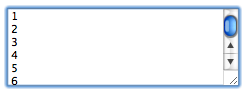
This is as expected. To scroll up or down the text area to read all the text in it, the form controls are present to do this. As you resize the text area to be smaller in height (or it has been set to a smaller size in the code of the web page) the blue scroll bar disappears, but you can still use the up and down arrows. So far so good.
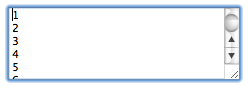
But when the text area is slightly smaller in height, suddenly the up and down arrows disappear.
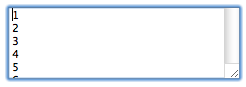
In Firefox the same problem occurs:
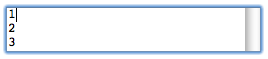
What should have happened instead is that the up and down arrows remained on screen, so the form can be easily controlled with the mouse. Here's how text areas of small height look in IE7 followed by Opera 9:


Note how Opera is using its own theme (or 'skin') for the text area, even though the browser has been set to use the Mac look. The giveaway is hovering over the arrows, which results in a yellow highlight, as used by Opera in its default theme. But at least the arrows are there.
Conclusion
All browsers and programs capable of zooming in should retain the rounded Aqua look of the buttons. This includes the blue border being outside the button, not inside it, and the background becoming blue on pressing the button down, not grey. I'm not sure why buttons change as you zoom in.