Photoshop Elements 7 Window Oddities
21st May 2009 · Last updated: 5th October 2016
In Photoshop Elements 7 on Windows XP, saving a file brings up the following:
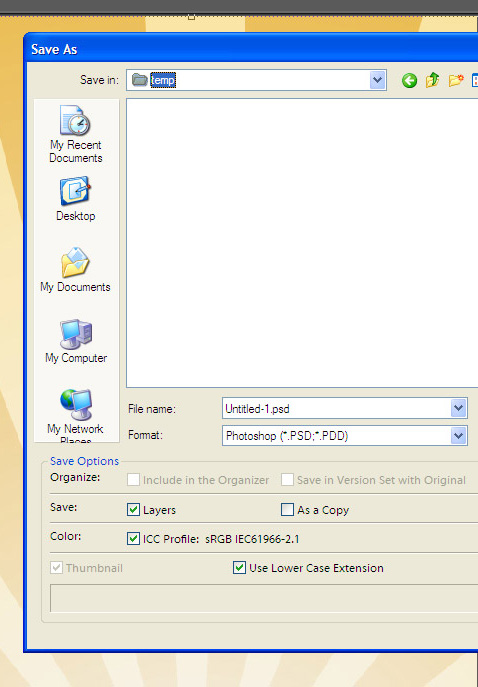
Note how My Network Places is cut off on the side panel. Also that Adobe are using a different font from the operating system for the options at the bottom. More on this in a moment.
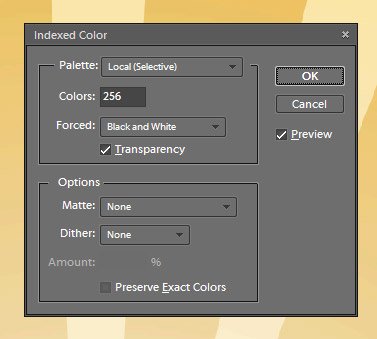
From the above window, saving an image in the GIF format brings up the following window. But what's this? A dark grey theme? It's to match the menus in the main program, which have a 'Lightroom' look about them. But either the standard XP theme or the dark grey Elements theme should be used, not a mix of both.
Straight after seeing the dark grey themed window, you get a standard XP window offering one final GIF option. Surely this could have been included on the previous window? (I can only assume the program branches out into a separate routine at this point which can't also be restyled.)
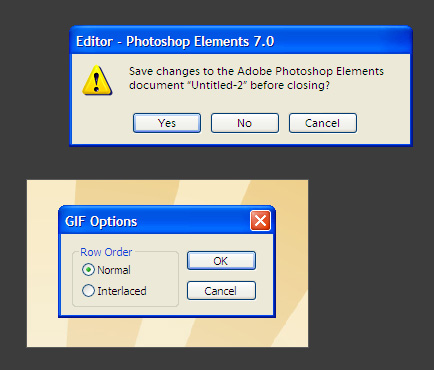
Compare the two windows above. One uses a custom font, the other is the default XP one. So not only are there two different themes being applied, there are also inconsistent fonts in the XP themed windows. The result is messy and unprofessional.
Conclusion
The user should see the same experience no matter what window comes up. I would advise sticking to the default XP theme, because it can also be changed by the user for accessibility or cosmetic reasons from within Windows itself.